One of my best friends is getting married next month. We’re all excited for the wedding, but there was a bit of an obstacle when it came to planning the bridal shower: the bride just moved across the country, and her closest friends and family are scattered over many different states.
Determined not to let that get in our way, I decided to throw a virtual bridal shower over video chat. With the technology available to us, a virtual bridal shower can be a great way to celebrate with friends when getting together in person is not an option, so I’ve compiled the things I’ve learned here so that others may throw their own virtual showers (this would work just as well for a virtual baby shower).
tip #1: it doesn’t have to be 100% virtual
I would strongly recommend incorporating some physical elements for your guests to engage with to make it feel more immersive, like a real party. Two weeks before the shower, I mailed a package to each guest (including the bride, of course!), containing the following items:
- Instructions for the shower
- A few feet of crepe paper
- An envelope of party games
- Tissue-wrapped party favors

Although I emailed instructions as well, I felt like having some tangible items would get the guests more excited — after all, who doesn’t like getting a package in the mail?
Check to see if your post office has a self-service kiosk for after hours — this makes it so much easier to send everything out whenever it’s convenient for you!
saving money
Assembling and mailing these packages was expensive, but it didn’t have to be. Instead of mailing a box to each person, you can save money by fitting everything into a large envelope (preferably padded) if you choose smaller favors.
tip #2: take advantage of google hangouts
Although Google Hangouts is not the only platform for group video chats, it is particularly well-suited to an event like a shower. Here are a few of its advantages:
invitations
If you use Google+ Events to send out the invitations, you have the option of setting up the event as a Hangout. This will add a link to the hangout to the event page, making it easy for guests to join once the event starts.
photo sharing
If you set up the Hangout as a Google+ event and use the Screen Capture app inside the Hangout, all of your screen captures will automatically be added to the event for guests to peruse afterwards. Guests can also upload their own photos to the event.
apps and extensions
Google+ has a few built-in apps and also allows 3rd party extensions, some of which are useful for playing games as a group. They can also be fun in other ways; for example, the Effects app uses facial recognition to allow you to add hats, fake mustaches, etc., to your image, as well as funny sound effects. In a bridal shower, this has the obvious benefit of allowing the bride to wear a virtual tiara:

Update April 2017:
Google has decided to take to take Hangouts in a different direction, and the apps I mentioned are no longer available. While you can still use Google Hangouts for the shower, Appear.in is another fun alternative.
tip #3: plan ahead
A virtual shower needs to be planned in advance since everything has to be mailed well before the shower. Not only the packages for the guests, described above, but also all of the gifts for the bride. I would recommend sending the invitations at least a month in advance and giving the guests a deadline of at least two weeks before the shower to RSVP.
When everything has to be prepared in advance, staying organized is essential. I used a combination of Google Docs and Trello, a free project management tool which I absolutely love, to stay on track.
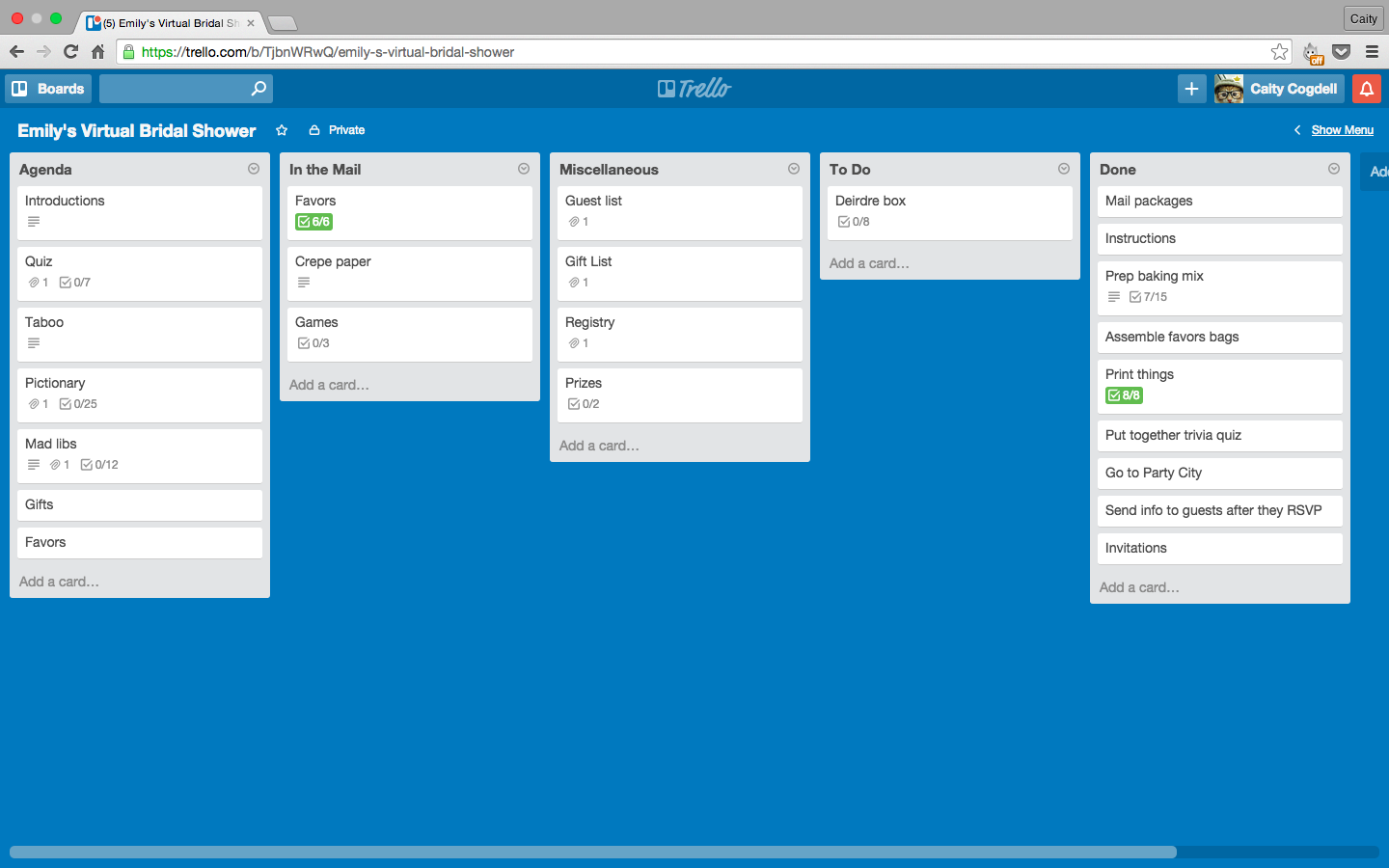
As much as I love organizing online, I would recommend printing everything you will need during the shower, as it is much easier to refer to a hard copy than to switch back and forth between screens during the actual event.
tip #4: communicate
Your guests will probably have never been to a virtual shower before, so communicating with them clearly before the event is key to making sure everything goes smoothly.
As I mentioned above, I included instructions in the package that was sent out and also via email. If I did this again, I would send the email first. Not everyone realized they should open the package in advance, and one person got confused and opened the favors too early. The lesson here: you can’t over-communicate.
Sample set of instructions (modify to fit your event)
- Do not open the bag of party favors or the “Party Games” envelope in advance.
- If you’ve never used Google Hangouts, go ahead and set it up and test it on the computer you will be using.
- Under Add-Ons in Google Hangouts, add the extension “Scoot & Doodle.” (if you are going to play Pictionary)
- Before the shower, hang up the decorations behind where you will be sitting. Check to make sure it will be visible.
- Have a writing utensil with you at the shower.
- If you have a pair of headphones, please have these with you at the shower as well.
address the worst case scenarios
When you’re helping the guests get ready for the party, don’t forget to plan for when things go wrong. After all, we’re dealing with technology here.
Google Hangouts can sometimes get this weird echo that makes it almost impossible to hear anybody. This can usually be prevented by having everyone wear headphones. If the guests do not have headphones, you can also get rid of the echo by having everyone mute their microphones if they’re not speaking, but that’s not as much fun and does not feel as much like a party.
Some other issues we encountered were people getting kicked out of the hangout accidentally and the microphones not working for certain guests. Announce at the beginning of the hangout what to do if you get kicked out (go back to the event page and click on Join Hangout) so that no one is unprepared. Also let everyone know about the chat feature so that they can use this if their microphone stops working.
tip #5: every party needs decorations

Just because it’s a virtual shower doesn’t mean decorations aren’t important! As I mentioned earlier, I mailed each guest a few feet of crepe paper before the shower, which I asked that they hang up behind them so that it would be visible on the screen in the video chat. (It was not quite long enough — I would recommend about 8 feet to be on the safe side.) This unifying element was one more way to bring us all together (figuratively speaking, of course) and add an air of festivity.
other ideas
I chose crepe paper because it was inexpensive and would be easy for the guests; however, any small decorations would work. You could use garlands, balloons (mail flat and ask the guests to inflate them), etc.
tip #6: break the ice
The guests may not all know each other, and there will be no opportunities for small talk over hors d’oeuvres in a video chat. To alleviate any awkwardness the guests may feel about video chatting with strangers, introductions are essential.
In our shower, each guest answered the following questions:
- What is your name?
- Where do you live?
- How do you know the bride?
- Tell us about a memory you have of the bride.
You could also play an ice breaker game such as two truths and a lie, if that’s more your style.
tip #7: play some games
Playing games together will help your video chat feel like a real party. Besides, there’s nothing to get a group of people to like each other like a little friendly competition and a lot of laughter.

- Group the games together: Most of these games involve mailing something to the guests in advance. I would strongly recommend placing any game-related items in an appropriately labeled envelope within your larger envelope or box and instructing the guests not to open it before the shower.
- Taking turns: Since you can’t conveniently sit in a circle on video chat, I recommend going by guests’ names alphabetically any time you need to take turns.
- Keeping score: Make sure you have some paper and a writing utensil on hand to keep score — trust me, this is so much easier than switching back and forth between screens to keep score on a document on your computer. Before the shower, draw or print a table with the guests’ names in the first column and then a column for each game where you can keep track of their points. (This is also a great place to jot down what gifts each person gave so you can send that information to the bride after the shower for her thank you notes
Sample score card
| Name | Game 1 | Game 2 | Game 3 | Gift |
| Anne | 3 points | 8 points | 5 points | Slow cooker |
| Jessica | 6 points | 5 points | 3 points | Coffee maker |
| Maggie | 4 points | 2 points | 7 points | Food processor |
game ideas
Expand for specific tips and instructions.
Quiz about the bride or couple
- Come up with a few questions about the bride or the couple. Mail each guest a pre-numbered card for their answers. Print a copy of the questions for yourself.
- Read the questions during the hangout and have the guests write down their answers.
- Go through the questions again, and this time have the bride announce the correct answer. The nice thing about having the bride be the judge is that you can include questions you don’t know the answer to yourself, as long as you’re sure the bride will know them.
- Whoever gets the most correct answers wins.
learn from my mistakes
If a guest does not get many of the answers correct, they may feel embarrassed about sharing their score. I think a better way to find the winner would be to ask, “Did anyone get all of the questions correct?” and then lower that (“Did anyone get 9 out of 10,” etc.) until someone answers. I would also recommend printing out the questions for yourself rather than having them up on the screen—it’s distracting trying to switch back and forth between windows.
Taboo
- Buy the “Don’t Say It” Bridal Shower game from Party City (or the Baby Shower equivalent), or make your own cards.
- Divide the cards evenly among the guests and mail them with everything else in advance.
- In the hangout, have each guest take turns giving clues for as many of their cards as they can get through in one minute.
- For each card that gets guessed, give the clue-giver one point. Whoever has the most points after everybody takes a turn wins.
learn from my mistakes
I originally tried to give a point both to the clue-giver and to the person who guessed the card correctly, as well as a bonus point if the clue-giver got through all of their cards before time ran out. Way too complicated. When everyone is shouting out answers, it can be impossible to tell who said what first.
Pictionary
Mail each guest 2-3 cards with wedding related words and phrases (or baby-related for a baby shower). I just searched “bridal shower pictionary” on Google and found several lists. These are the words we used:
- Veil
- Wedding Cake Topper
- Father of the Bride
- Limousine
- Tuxedo
- Seating Chart
- Champagne
- Always a Bridesmaid, Never a Bride
- Tie the Knot
- Bachelorette Party
- Till Death Do Us Part
- Wedding Bells
- Cutting the cake
- He Loves Me, He Loves Me Not
- Something old, something new, something borrowed, something blue
- First Dance
- Father Daughter Dance
- Honeymoon
- Rehearsal Dinner
- Tossing the Bouquet
- Flower Girl
- Garter
- Bachelorette Party
- Maid of Honor
- Get Me to the Church on Time
Ask each guest to install the Scoot & Doodle app on Google Hangouts.
Whoever guesses the most words wins a prize.
learn from my mistakes
When we did this, whoever guessed the answer also drew the next clue, which I would email to them. I don’t recommend doing it this way; it’s more complicated, and not everyone gets a chance to draw. I think it would better to just rotate through all of the guests and track the points separately. I also was surprised by how long this took — we had 25 words, and it probably took about an hour to go through them all. Pictionary is not as fast-paced as Taboo — I would recommend keeping it to about 15-20 clues max, 2-3 per guest.
Update April 2017:
Sadly, Scoot & Doodle is no longer available. ☹️ You can still play this game, but you’ll need to be more creative. I’d suggest using the screensharing option and having the “artist” use a program like Paint or Google Drawings. If you have any other suggestions for how to play Pictionary over video chat, please share in the comments!
Mad Libs (my favorite!)
- Print a numbered card for the guests to write their words in. Mail this in advance along with a fill-in-the-blank card with the rest of the story or message. Make sure the instructions clearly state not to look at these cards in advance.
- Print a key for yourself listing which part of speech goes with each number.
- During the hangout, read the parts of speech that the guests should write down for each number.
- After the guests have written these down, have them take out the other card to fill in the blanks with the words they chose.
- After everyone has filled in their card, have everyone take turns reading them out loud. Be prepared to laugh—a lot.
- I did a Google Image search to find examples of bridal shower mad libs (I’m sure you could find some for baby shower mad libs this way too). I modified one for the guests, then adapted that to make a different one for the bride that would still use the same parts of speech. These are what I used:
guest card:
Wedding Advice for the Bride
We are all (adjective) to be here today with you to celebrate your (noun). Although I love and support you both, let’s face it, I’m really here for the (noun)! With my many years of wisdom, here is my best advice to pull you through the (adjective) years ahead:
Don’t forget that you should always (verb) (adverb). You should never (verb). May your (adjective) lives be filled with (verb – gerund) and (verb – gerund). Cheers to the next (number) years, together with love and (noun)!
bride card:
A Wedding Vow
(Groom’s name), I am so (adjective) to have you as my (noun). After so many years together, I can’t believe we are finally celebrating our (noun)! I am offering you this (adjective) vow for our lives together:
I promise to always (verb) (adverb), and I will do my best not to (verb). I will strive to make our lives together (adjective) and to fill our days with (verb – gerund) and (verb – gerund) for the next (number) years. Above all, I promise to always love (noun).
learn from my mistakes
As with the other games, I didn’t print a key for myself and had to keep switching between windows to read the parts of speech for each number. It was very distracting; I would definitely recommend printing it out.
Bridal shower bingo
- Mail each guest a blank bingo card and have them fill it in with items they think the bride will receive. The first person to get 5 in a row wins!
- This also works well for a baby shower.
- If you have a small number of guests, 6 or fewer, there may not be enough gifts for this game to work. If you do have enough people, though, it is a good way to keep the guests engaged while the bride-to-be (or mom-to-be for a baby shower) is opening her gifts.
Many of these bridal shower games from The Knot would also work well on video chat.
prizes
Showers are more fun with prizes, but there’s no need to make another trip to the post office. Send a $5-10 gift card (depending on your budget) to each winner from an online store such as Amazon or ModCloth that will allow you to send the gift card code via email. Amazon will let you send several at once and is more versatile, although ModCloth is cuter and more girly, which makes it a great choice for a shower.
tip #8: don’t forget party favors!
Party favors are essential! They do not need to be large or expensive — just a little token to let the guests know that they are appreciated and to make them feel like they’ve just attended a party, not just a regular video chat.

I chose bulky favors that fit the shower’s baking theme (and were super cute) but which had to be shipped in a box. This added up quickly when it was time to pay the post office. By choosing smaller, flatter favors, you could easily fit everything in a padded envelope and save some money. When choosing favors, keep in mind that weight is also a factor in the shipping cost.
Here are a few ideas for favors that would be easier to ship:
- Mini picture frames
- Keychains
- Small tea candle
- Chocolate (as long as it’s not too hot outside!) or gourmet lollipops
- A mixed CD of the bride’s favorite songs
- Stationery
- Lip balm or gloss
- Handmade soap
Make sure they are wrapped up together (with instructions not to open them) so that the guests do not see them before the end of the shower!
tip #9: have fun!
I hope you’ve found these tips to be helpful in planning your own virtual bridal shower or virtual baby shower. Of course, the most important piece of advice I could give you is to have fun. After all, this is a party, not an exam!
Other ideas for how to throw a great virtual party? Share them in the comments!

 Caity Thinks
Hey, I wanted to thank you for this AMAZING post! I had to plan a last minute virtual Bridal Shower for a co-worker and we used your Mad Lib and Pictionary games ideas and everyone loved them! I appreciated that you put the detail and the tips of things to avoid that you learned from planning your friend’s shower. Thanks again!
LikeLike
Hi, I love this and I’m planning a shower for a friend who has friends all over, so this works! One concern I have is that she has lots of friends. What size group did you have? Is there a point where you think it would become unmanageable?
LikeLike
Hey, I’m so sorry I didn’t see this sooner! I imagine you’ve already had your shower by now, but we had 8 or 9 guests. Hope it goes/went well!
LikeLike
Thank you for all the great ideas! I’m thinking of throwing in a surprise element for the bride. I would include her fiancé so he can make sure she’s there, and I will ship the box to him in advance . I will let you all know how it works out.
LikeLike
Great idea, let us know how it goes!
LikeLike
We used many of your ideas when we threw a virtual shower last weekend – thank you! Since google hangouts wasn’t an option for us, we used Zoom Meeting. You can buy a 1 month subscription ($15, I believe) and it worked great! They provided a link in advance and no one reported any problems using it. Each guest was up on the screen and everyone could see and hear one other. As “hosts,” we could “spotlight” the brides – making their image pop out larger – when they were opening gifts.
We played 3 games. I made a crossword online with clues about the brides. We had a spice game – a big hit! – with little numbered packets of spices and you had to guess which spice was in each (hard!). And, finally, we did the Disney love songs matching game. We played Disney music while guests worked on their answer sheets. To keep mailing costs down, we used flat padded envelopes as you suggested (about $4.50/envelope). We ordered koozies in the wedding colors and had them personalized. Everyone was instructed to put their favorite beverage in the koozie during the shower. We sent packaged trail mix (the brides live in CO and love to hike). And, instead of the crepe paper, we made pennants with the brides’ initials.
LikeLike
Love these suggestions! Really cute idea about the spice game—I’ve done that at an in-person shower before, but wouldn’t have thought about it for a virtual one.
I use Zoom a lot for work and agree that it’s a great tool. Glad your shower was such a success!
LikeLike
Oh my goodness! Thank you so much for the lovely ideas. My daughter-in-law and son are going to be out of state but I want to show our large family’s support! The bride does not have the time for a shower…this is perfect!!!
LikeLike
Glad this was helpful! Would love to hear how yours turns out. 🙂
LikeLike
I am having a virtual shower for my niece. Everyone, including me, lives in various states other than where the bride lives. Did you have people send the gifts to the bride in advance and she opened them while everyone was on-line? Did that drag out too much? How did you politely ask everyone to mail the gifts to arrive by the shower date and time?
Thanks!
LikeLike
Yes, everyone had their gifts mailed to the bride in time for the shower, and she opened them on the screen. I didn’t feel like that part dragged out (although we were behind schedule because some of the games took longer than expected). It was very similar to watching a bride open gifts at an in-person shower.
Gifts are expected at a shower, so I don’t think you need to be too subtle with your instructions to your guests. I would include in the invitation an explanation that the bride will be opening gifts during the shower, and suggest a date for sending the gifts to make sure that it arrives in time. If you’d like to be extra polite, you could phrase it like this: “If you would like to send a gift, please make sure it’s shipped directly to the bride by [date] so that she can open your gift during the shower.” You may also want to send a follow-up email closer to the shower with a reminder and any other instructions for the guests.
What a great aunt to throw a shower for your out-of-town niece! I hope you all have a great time!
LikeLike
Thank you so much for this. We have to cancel my daughter’s bridal shower and she is coming around to the virtual idea! 🙂
LikeLike
I’m sorry you had to cancel, but I hope you’re able to have a wonderful virtual celebration for her!
LikeLike
thank u
LikeLike
Would having a schedule so people can join in when they want be right? Also, food…..I was thinking about having food (small pizza or spaghetti dinners)delivered to guests at a specific time….what are your thoughts on this idea?
LikeLike
I certainly think it’s good to have a schedule in mind, but in my experience, it can be difficult to judge in advance how long certain activities will take, and you’ll need to read the room to see if people are still enjoying an activity or you should move on. I’d suggest simply welcoming people to join late if they need to, rather than trying to adhere to a specific schedule.
As for food, you may want to ask your guests how they feel about eating on camera. I’ve had remote lunches with coworkers before and enjoyed it, but many people feel self-conscious about it. It also may be hard to guarantee that everyone gets the food at the right time. That said, if you can have the food delivered in advance, and if your guests are comfortable eating over video, go for it! There’s nothing like sharing a meal together.
LikeLike